
macOS Menu Bar Apps Every AI Developer Should Have in 2026
The menu bar is underrated real estate: always visible, never in the way, one click away from the thing you need sixty times a day. For developers — especially those running AI agents, long builds, and parallel terminals — a good menu bar stack cuts context switches and saves actual hours per week.
Below is a curated list: no affiliate links, no sponsorships. The only disclosure is #1, which I build.
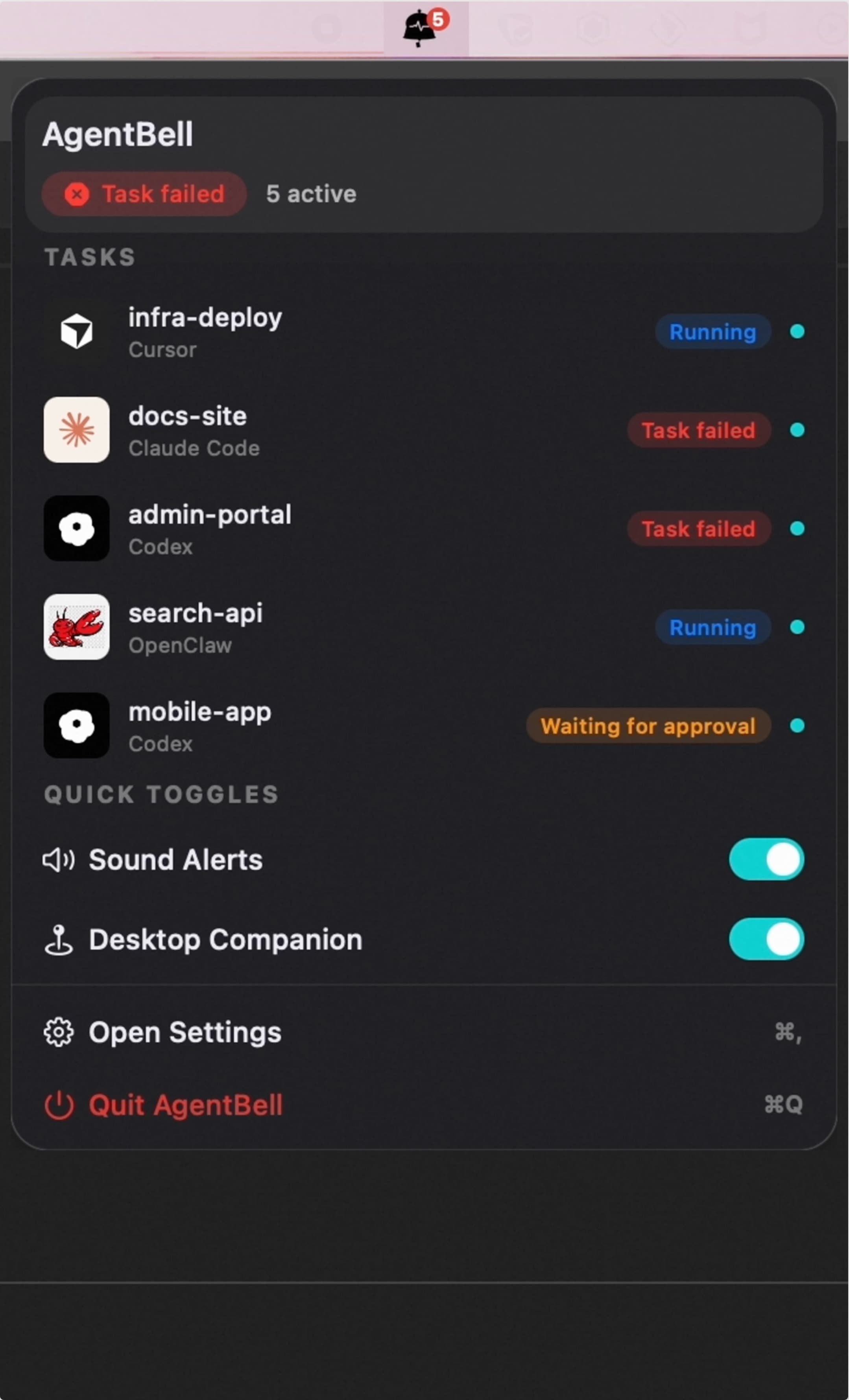
1. AgentBell — AI agent state at a glance ⭐
What it does: Sits in the menu bar and tracks task state across AI coding tools — e.g. Claude Code, Cursor, Codex, Windsurf, VS Code (MCP), OpenClaw — so you know when something finished, errored, or is waiting for you without staring at three terminals.
Why it matters in 2026: "Vibe coding" often means delegating long jobs and walking away. The failure mode is not the model — it is forgetting which agent was doing what. A persistent menu bar indicator fixes that.
Notable details:
- Native Swift/SwiftUI (not Electron).
- Does not read your code or chats — only state signals via hooks/MCP.
- Optional desktop companions (Live2D / video) if you want ambient feedback; can stay menu-bar-only.
Pricing: Free tier for core alerts across integrations; Pro for characters, voice packs, dashboard.
Link: agentbell.dev
Disclosure: I make AgentBell. If you only pick one item from this list for AI-era workflows, bias acknowledged — it is the one that did not exist in 2023.
2. Raycast — Command palette for everything
What it does: Spotlight-style launcher + extensions: clipboard history, window management, Jira, GitHub, Slack, snippets, and thousands of community extensions.
Why devs love it: Replaces a pile of single-purpose utilities with one keyboard-driven surface (Option+Space or your binding).
AI angle: Extensions for LLM quick prompts, repo search, and doc lookup — useful when you want one hotkey instead of hunting browser tabs.
Pricing: Generous free tier; Pro for sync and advanced features.
Link: raycast.com
3. Bartender / Ice — Menu bar organization
What it does: Hides, reorders, and groups menu bar icons so the right side of your screen does not become an unreadable icon soup.
Why it matters: Once you add AgentBell, Raycast, VPN, battery, mic, Docker, etc., without a organizer you will hide the very status you care about.
Options:
- Bartender (paid, polished).
- Ice (open source, lighter).
Pricing: Bartender is paid; Ice is free.
4. Stats — System monitor (CPU, RAM, network, sensors)
What it does: Menu bar graphs for CPU, memory, disk, network, fans, sensors — lightweight compared to opening Activity Monitor.
Why for AI devs: Local inference, indexing, Electron apps, and parallel agent processes spike CPU and RAM. Seeing it in the bar catches runaway jobs before your fans sound like a jet.
Pricing: Free (open source).
Link: github.com/exelban/stats
5. CleanShot X — Screenshots + annotations + scrolling capture
What it does: Region capture, scrolling window capture, quick annotate, pin to screen, GIF/video — all from a small menu bar presence or hotkey.
Why for AI devs: You will file hundreds of bug reports, PR comments, and docs with screenshots. Speed here compounds.
Pricing: Paid (one-time or subscription depending on offer).
Link: cleanshot.com
6. Itsycal — Tiny calendar
What it does: Dropdown month view with events; minimal, fast.
Why: Meeting overload + agent runs = you need to see when you are free without opening Calendar.app.
Pricing: Free.
Link: mowglii.com/itsycal
7. Meeter (or similar) — Join meetings fast
What it does: Pulls upcoming meetings from Calendar; one click to join Zoom/Meet/Teams.
Why: Saves 30 seconds * ten meetings a week = real time. Reduces "find the link in Slack" friction.
Note: Exact app names change; search the App Store for meeting join menu bar if Meeter's model shifts.
8. One Switch — Toggles for dark mode, hidden files, Xcode derived data, etc.
What it does: Single menu bar dropdown for macOS toggles developers use often: Dark Mode, Hide Desktop Icons, Keep Awake, etc.
Why: Faster than defaults write or remembering obscure shortcuts when pairing or demoing.
Pricing: Paid.
Link: fireball.studio/oneswitch
9. Maccy — Clipboard manager
What it does: Lightweight clipboard history with search — menu bar or hotkey.
Why: Copying prompts, stack traces, API keys (careful!), and log snippets between terminal, browser, and IDE is constant.
Pricing: Free (open source).
Link: maccy.app
10. Amphetamine (or built-in caffeinate) — Keep awake
What it does: Prevents sleep during long builds, model downloads, or agent runs.
Why: Losing Wi-Fi or SSH mid-job because the lid closed is a preventable failure.
Pricing: Free (Amphetamine on Mac App Store).
How I stack them (example)
Minimal AI-dev bar:
- AgentBell (agent state)
- Stats (resources)
- Raycast (launcher)
- Maccy (clipboard)
- Bartender/Ice (hide the rest)
Heavy product + meetings:
Add Itsycal + meeting joiner + CleanShot.
What I wish existed
- A standard, cross-editor "agent state" protocol so every IDE exposed the same five states (
idle/running/waiting/done/error) to the OS. MCP helps; we are not fully there yet. - First-party macOS APIs for "long-running developer tasks" that integrate with Focus modes and Live Activities — today we glue this together with hooks and menu bar apps.
TL;DR
- Menu bar apps are ambient UX: high leverage for devs who context-switch constantly.
- For AI coding workflows, something that answers "is my agent done?" belongs in the bar — that is the niche AgentBell targets.
- Round out with Raycast, Stats, clipboard, screenshots, and menu bar organization — boring picks that save the most time.
Related: Best way to track multiple AI coding agents · Claude Code notifications